Guide · Settings
Stash tabs the bot uses
The bots take fragments, maps, items and currency from the stash tabs you name and put the loot into others. Name each tab on the bot's page exactly as the game shows it.
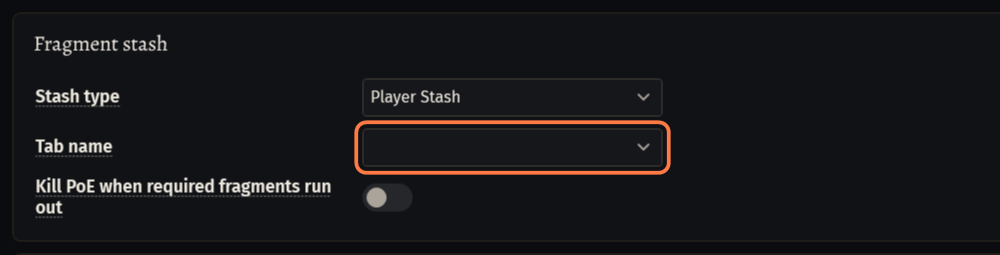
How a tab field works
Every tab field on the bot's pages works the same way.
Start the game and log in with the character, so the bot can read your stash.
Click the arrow of a tab field. The list shows the tabs of your stash, read from the game. Click a tab to pick it.
- A field for several tabs shows a tick box at each tab. You can also type the names separated by commas, for example
frag, loot2. - Without the game the list says Open the game to pick a tab, or type its name. You can type the name yourself.
- A field for several tabs shows a tick box at each tab. You can also type the names separated by commas, for example
Type a name exactly as the game shows it. Upper and lower case do not matter.
Important: The default names 1, 2, 3 work as long as the tabs keep their order: some fields read a number as the tab's place (1 = first tab). If you move tabs around, give them names with letters.
Boss and map bots: the Stash tab
The boss bot (.boss) and the map bot keep their tabs on the Stash tab of the bot's page.
Open the bot's page and click the Stash tab.
Fragment stash: choose Player Stash or Guild Stash in Stash type. In Tab name pick the tab with the fragments, maps or invitations of the method.
- Empty Tab name: the bot takes the items for a run from the tab that is open when the stash opens. Set the tab to be sure.
- Kill PoE when required fragments run out closes only this bot's game window. It is off by default.
Dump stash: choose the stash and the Tab name for the loot. With several tabs the bot fills them one after another.
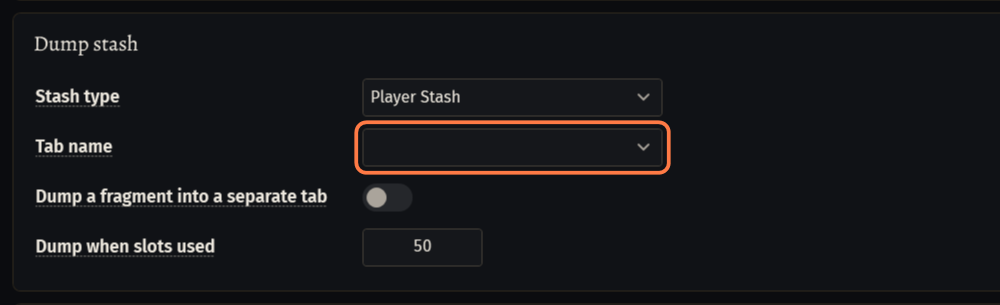
- Empty Tab name in the Player Stash: the loot goes into the tab that is open, and when it is full, into the next normal or quad tab with room.
- Dump when slots used: the bot stashes its loot when this many of the 60 inventory cells are taken (50 by default).
To keep dropped fragments apart from the other loot, switch on Dump a fragment into a separate tab and pick the Fragment tab.
Fortress, Ziggurat and Abomination have one more card, Vaal fragments, with its own tab field. Some map bot methods add a tab field on their own tab.
Currency for buying
Boss bot: buying fragments or maps at Faustus pays from the PAY FROM stash and tab of the BUY card on the Trade page. PUT TO is where the bought items go.
- An empty PAY FROM tab means the currency tab of that stash.
Act Bot: Wisdom, Transmutation and Alteration for shopping come from the stash of Take items from on the Start tab (next section).
Act Bot: the Start tab
Open the act bot (.actbot). The page opens on the Start tab.
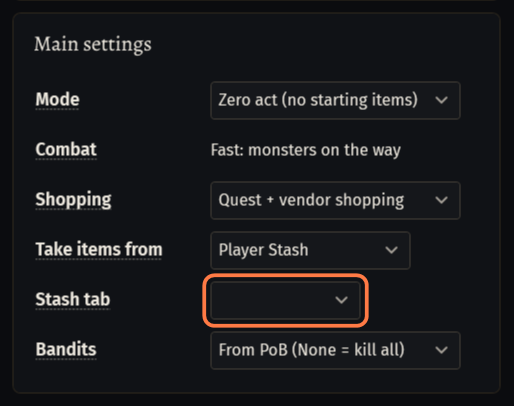
Take items from: choose Player Stash or Guild Stash. From it the bot takes the items of your PoB build and Wisdom, Transmutation and Alteration for shopping.
Stash tab: the tab name or number (1 = first tab). Empty: the bot looks in all tabs.
What the act bot puts away (with Stash gems, cards and uniques on the Town & items tab) goes to the Player Stash: the open tab first, then the next tab with room. A special tab, such as the currency tab, takes only its own kind of item.
The guild stash
Choose Guild Stash in the field's stash list. The guild stash has tab names of its own: pick them from the list while the game is open.
The character must be in the guild and allowed to take from that tab, and to put into it for the loot.
Place the Guild Stash in your hideout next to your own stash, so the bot can reach both.
If something goes wrong
What you see and what to doStash: Guild tab '4' was not found. Available: 1, 2 (W-FPKE)- A tab on the bot's page is not in that stash. After Available the line lists the tabs the bot sees. Pick one of them in the field, or fix the name. The guild stash has its own tab names.
Stash: Live stash supply: could not select Decaying Fragment tab '4'. (W-HT3D)- The same cause: Tab name under Fragment stash names a tab this stash does not have. Remove it from the field or fix the name.
Stash: Failed to switch to dump tab '15'.- Tab name under Dump stash does not match a tab of the dump stash. A number here is read as the tab's place: '15' means the fifteenth tab. Pick the tab from the list.
Stash: Player Stash tab '1' has no room for 'Swift Affliction Support' (1x1). (W-HVC3)- That tab is full. Empty it, or pick another tab on the bot's page. The act bot tries the next tab by itself.
Stash: No normal or quad stash tab has room for the 12 item(s) left. (W-HP3R)- The boss or map bot found no room in any normal or quad tab of the Player Stash. Empty a tab or add one, then start the bot again.
Loot: No room in the inventory for an item (Magic, 2x2, 5 cell(s) free). (W-95WH)- Now and then this is normal: the act bot goes to town when fewer cells are free than Town run below free cells (Town & items, Advanced). If it repeats, take your own items out of the inventory.
Stuck on a step?
Ask in #support on our Discord and send your log with Copy log: it shows what the bot saw.