Guide · Act Bot
Act Bot: the campaign on your build
The act bot (.actbot) plays the story of acts 1 to 10 with your character: it follows the quests, spends the passive points and levels the gems of a build and takes better gear on the way. You give it the build; most settings can stay as they are.

The Act Bot module in your key
The act bot needs the Act Bot module in your key. Without it .actbot in the menu is dimmed with a lock, its page says Not in your key, and Start does not work.
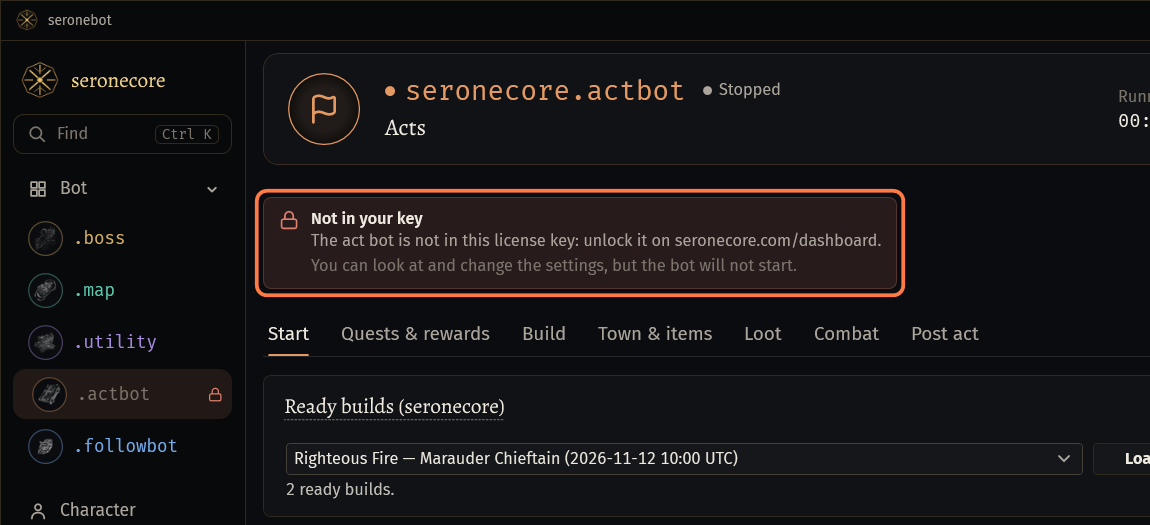
Add the module on the dashboard of seronecore.com. Then click .actbot under Bot in the menu.
Give the bot a build
The Start tab has three ways to give the bot a build. One is enough.
Ready builds (seronecore): choose a build in the list and press Load. Mode, tree, gems, items and settings come with it, and the bot follows the updates of that build.
My builds on seronecore.com: the builds you saved in the act editor on the site, with the Discord account of this key. Press Refresh, choose one and press Load. The build you send to the bot in the act editor loads by itself.
Path of Building: paste a PoB export code, or a pobb.in, pastebin.com, poe.ninja/pob or act editor link, and press Load. The line under it says Loaded at and the time.
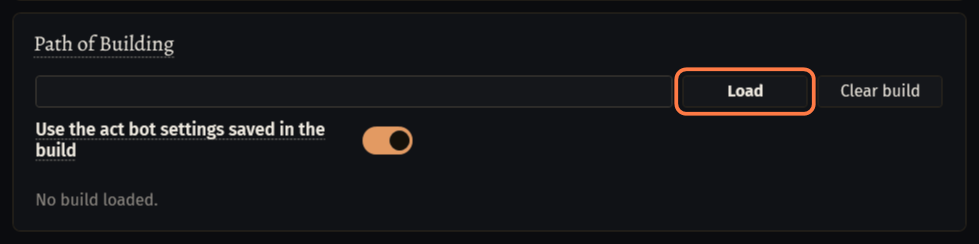 Important: Load a build of your character's class: the passive tree of a build starts from its class.
- The build is kept in the settings: no network is needed later.
- Use the act bot settings saved in the build: builds of the act editor can carry act bot settings, and on Load they replace the settings on the page. Other PoB builds have none.
Main settings on Start
Mode: Zero act (no starting items) plays from scratch with loot, vendors and rewards. Full leveling items (prepared PoB items) wears the items of your PoB item sets, which you put into the stash in advance.
- Choosing a mode also sets its loot, shopping and item options. You can change them after.
Shopping: Quest + vendor shopping buys the PoB gems, better flasks and gear in town. Quest only (rewards, loot, PoB items from stash) buys only the PoB gems.
Take items from and Stash tab: the stash and tab with your PoB items and the Wisdom, Transmutation and Alteration for shopping. An empty tab means all tabs.
Bandits: From PoB (None = kill all) takes the bandit of the loaded build.
Quests and rewards
Open the Quests & rewards tab. Story quests are always done.
Switch on the optional quests you want in the list of each act, or press Only passive quests or All optional quests.
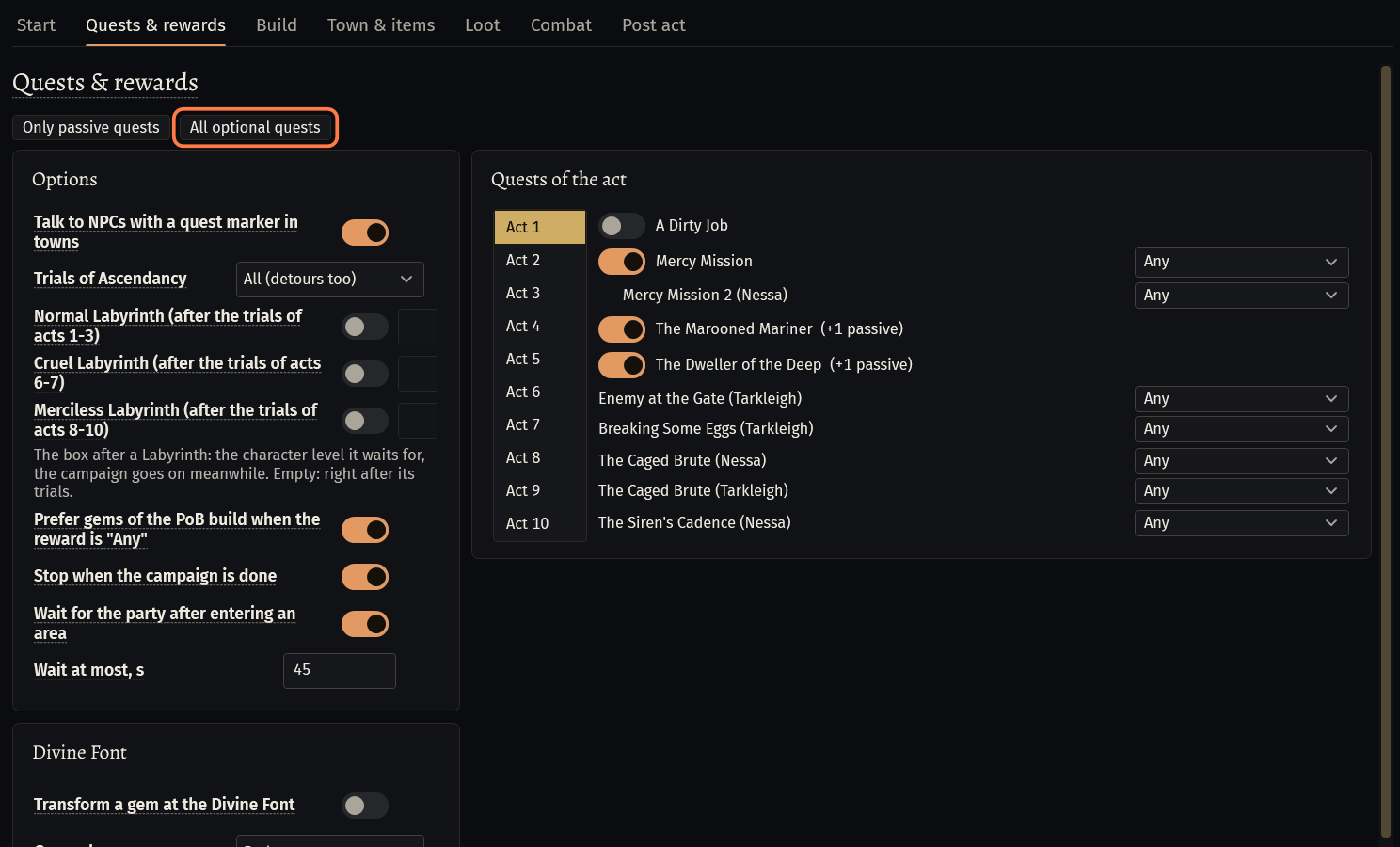
A quest with a reward has a list next to it. Any lets the bot pick: a gem of your PoB build first, then what helps most. You can also choose the reward by its name.
Trials of Ascendancy: All (detours too) by default. On the way only does only the trials in the areas the quests lead through; Off skips them.
Talk to NPCs with a quest marker in towns and Stop when the campaign is done are on by default.
Labyrinth
The Labyrinth is off by default. On Quests & rewards, under Options, switch on Normal Labyrinth (after the trials of acts 1-3).
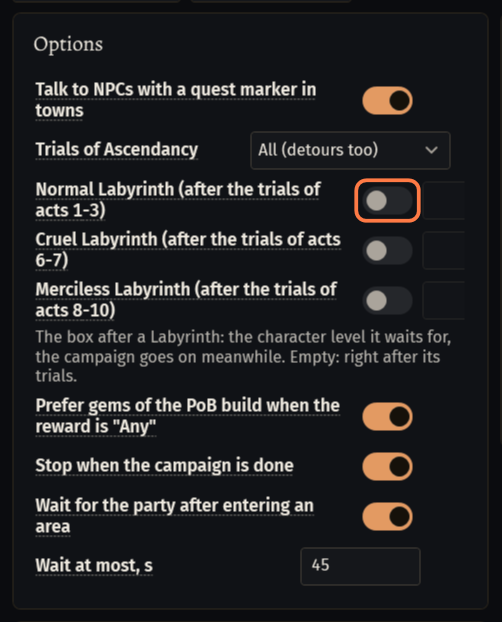
Once the six trials of acts 1-3 are done, the bot goes into the Labyrinth, runs it to the last Izaro, picks the ascendancy class of your PoB build at the Altar of Ascendancy and leaves through Return To Town.
- The Labyrinth needs all six trials: keep Trials of Ascendancy on All (detours too).
The box right after the switch is the character level the Labyrinth waits for; the campaign goes on meanwhile. Empty: right after its trials.
- Cruel Labyrinth (after the trials of acts 6-7) and Merciless Labyrinth (after the trials of acts 8-10) have switches of their own, also off by default.
Build: passive tree and gems
Open the Build tab. Spend passive points on the PoB tree is on: the bot takes the nodes of the build's tree in town or when no monster is near.
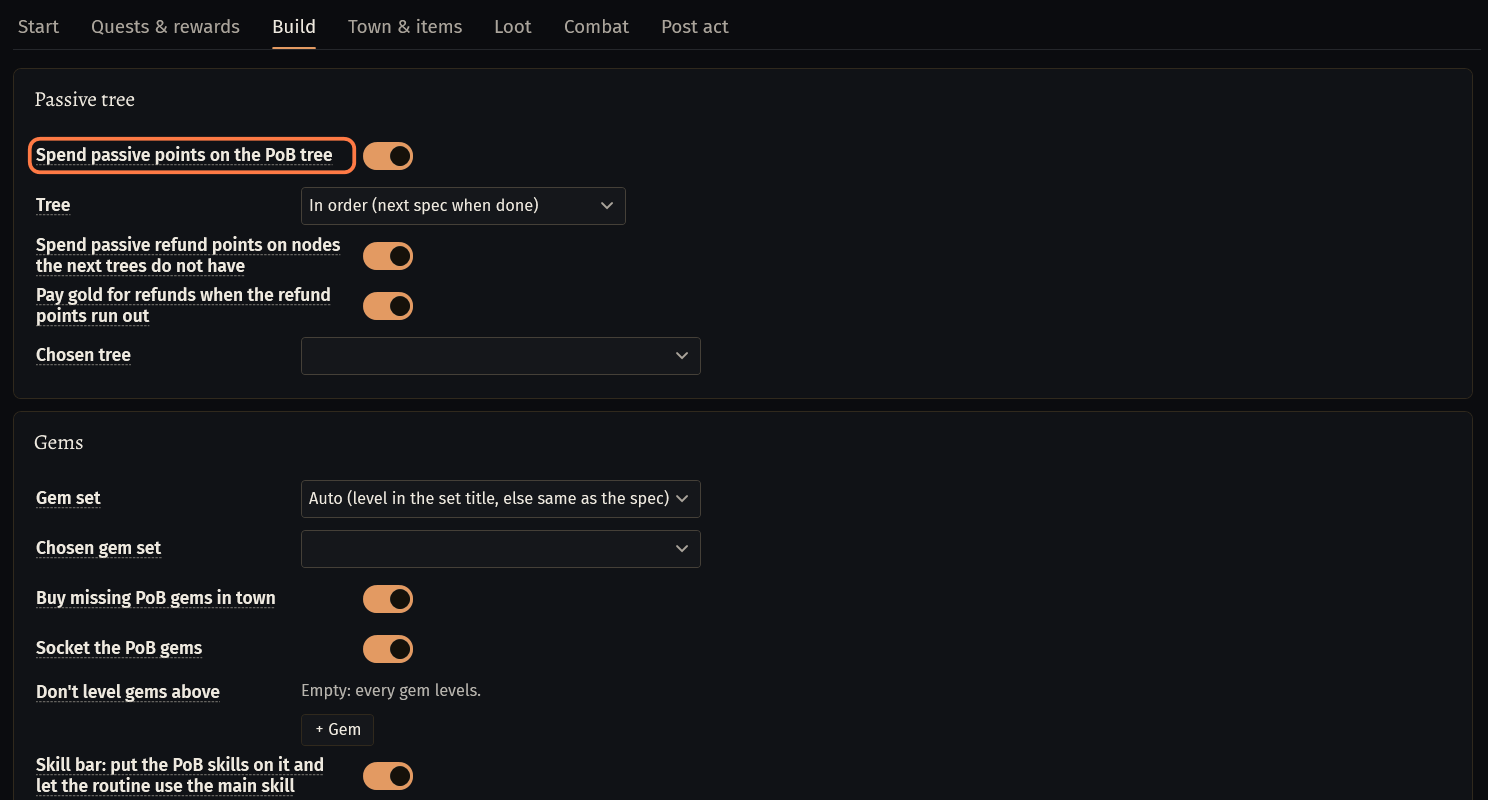
In Gems, keep Buy missing PoB gems in town, Socket the PoB gems and Skill bar: put the PoB skills on it and let the routine use the main skill on. With them the character plays the skills of the build.
With these switches on, the bot presses the skills of your build by itself: the main skill, curses and marks, totems and Flame Wall on bosses, auras, golems and movement skills. Which skills and how: Your build: what the bot presses by itself.
Town and items
Open Town & items. In Town, Sell when the inventory is % full (60 by default) sets when the bot sells junk and stashes in town.
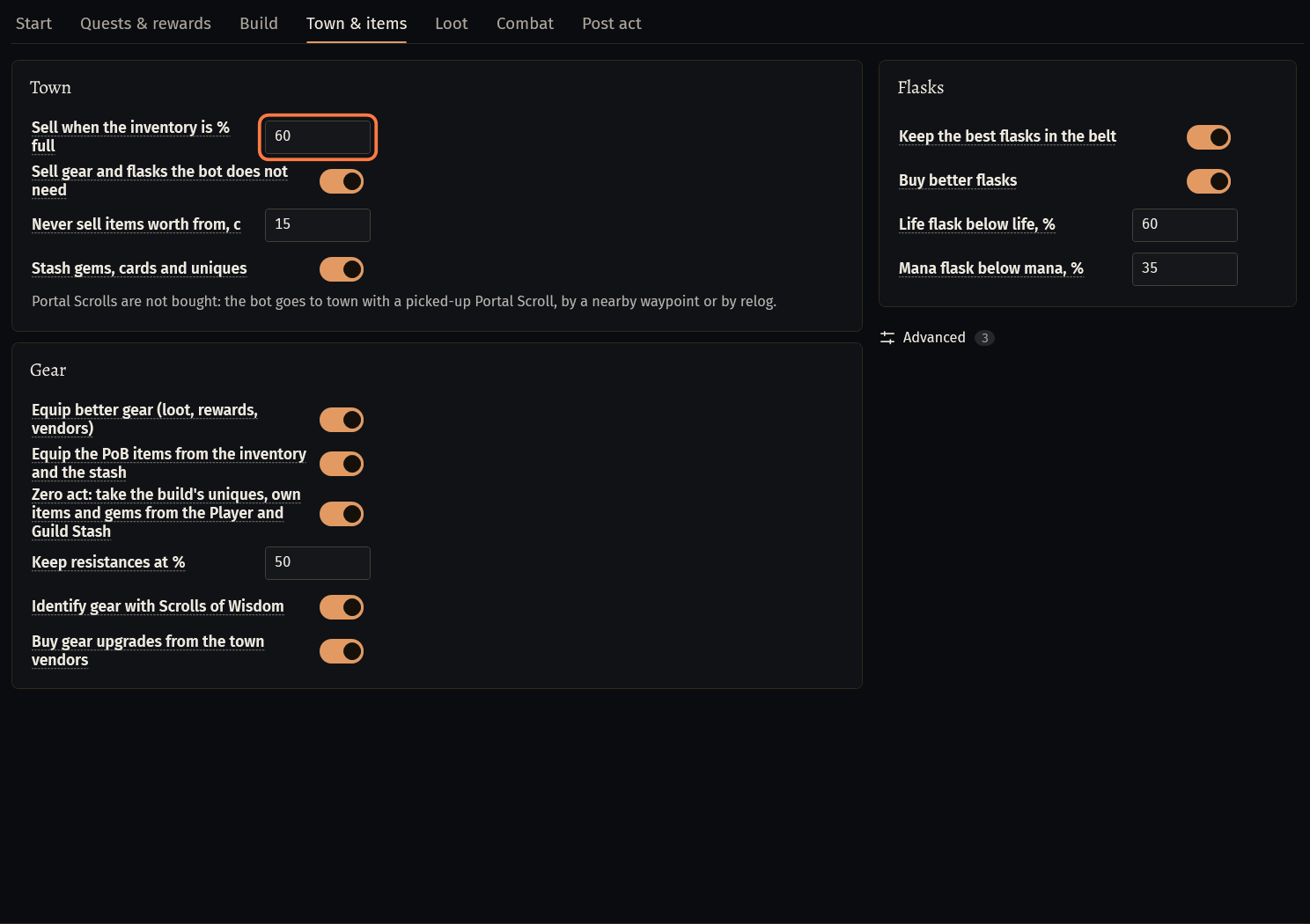
Never sell items worth from, c (15 by default): items worth that much by poe.ninja go to the stash, not to the vendor.
Stash gems, cards and uniques puts them into the Player Stash. Currency stays in the inventory.
In Gear, Equip better gear (loot, rewards, vendors) and Equip the PoB items from the inventory and the stash are on. Keep resistances at % (50 by default) makes the bot prefer gear that keeps fire, cold and lightning resistances at that level.
In Flasks, Keep the best flasks in the belt chooses the flasks and sets their use by itself.
Portal Scrolls are not bought: the bot goes to town with a picked-up Portal Scroll, by a nearby waypoint or by relog.
Loot
Open Loot. In Where to take from, Everything on the ground takes by the switches below, also what your game filter hides: the bot clicks it with Alt. Through the game filter takes only what your game filter shows, and of it by the switches.
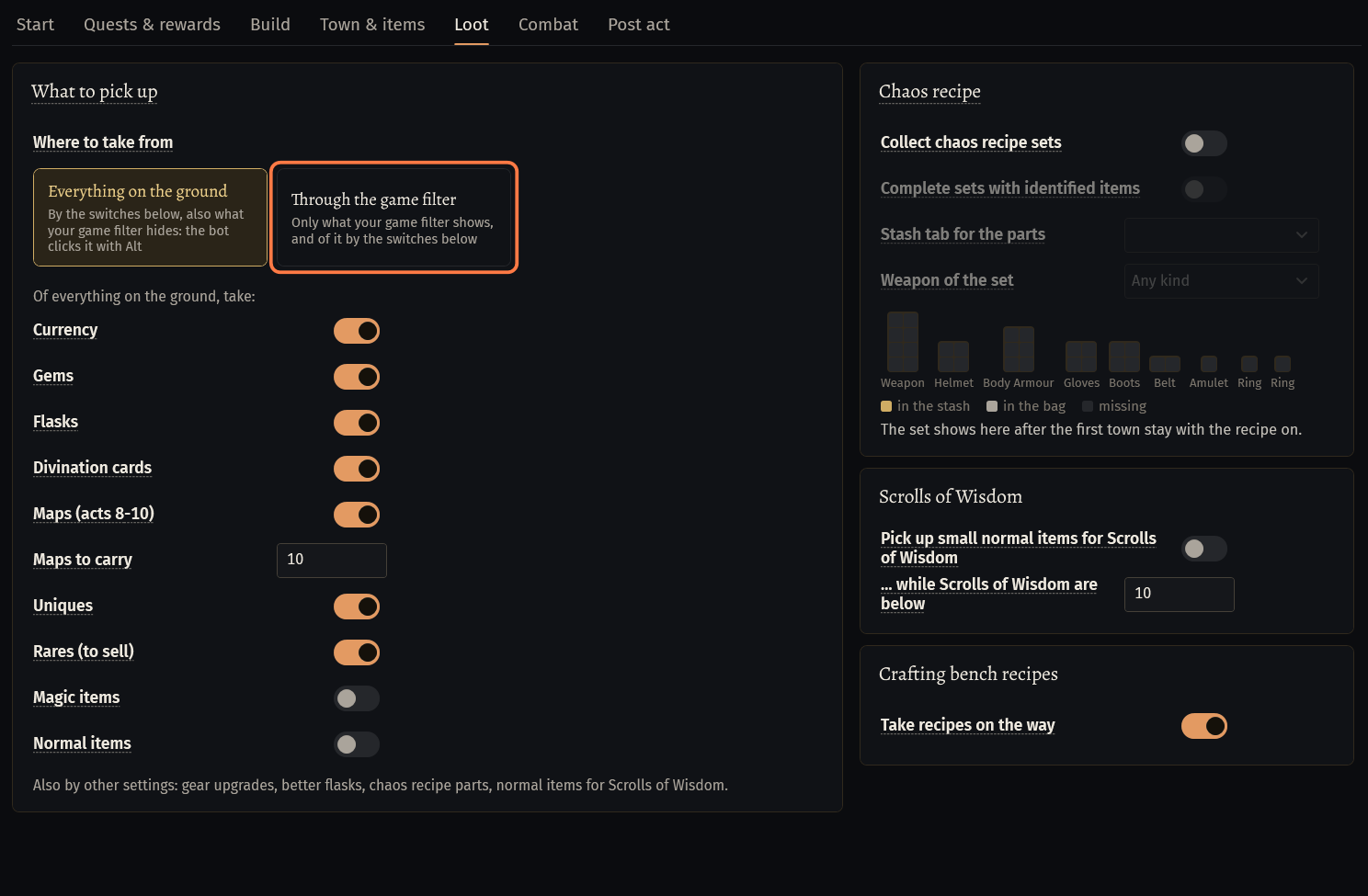
Switch on what to pick up: Currency, Gems, Flasks, Divination cards, Maps (acts 8-10), Uniques, Rares (to sell), Magic items, Normal items.
Quest items and Labyrinth keys are always picked up. Gold is collected by walking over it.
Start and what to expect
Log in with the character, open .actbot and press Start.
The bot plays the story act by act. Status, Quest and Step on the Start tab show what it is doing; the bot card shows the Level and the Deaths.
Deaths happen, more in the first acts and at bosses. After a death the bot goes on by itself.
What happens after Kitava is set on the Post act tab: Stop, Atlas maps or Farm an area. By default it is Atlas maps, which has a guide of its own. To end with the campaign, choose Stop: the bot stops in Karui Shores.

If something goes wrong
What you see and what to doAct bot: ACT BOT LOCKED: the act bot is not in this license key. Bot will not start. (E-2S9M)- Your key does not include the Act Bot module. Add it on the dashboard of seronecore.com.
Act bot: Free passive points, but no PoB build is loaded (Passives tab). Points are kept. (W-CSJJ)- No build is loaded. On the Start tab load a ready build, one of your builds on the site or a PoB code with Load. The log line says Passives tab; the fields are on Start.
Act bot: The PoB build is for a Witch, the character is a Ranger: passive points are kept (3 free). Load a build of the character's class (Passives tab, or the build sent on the site) or play a Witch. (W-CSJJ)- The loaded build is for another class. Load a build of your character's class on Start, or send one in the act editor on the site.
Stuck on a step?
Ask in #support on our Discord and send your log with Copy log: it shows what the bot saw.