Guide · Act Bot
Build editor: your PoB on the site
The act editor on seronecore.com turns a leveling build into a plan for the act bot: the passive tree step by step, gems and items by character level. You save the build, send it to your act bot, and the bot loads it by itself.
Open the editor
The editor comes with the Act Bot module of your key. The free 2 hours run the act bot with the ready builds, but do not open the editor.
Sign in on seronecore.com with the Discord account of your key. On the dashboard, click Act editor in the menu under Site.
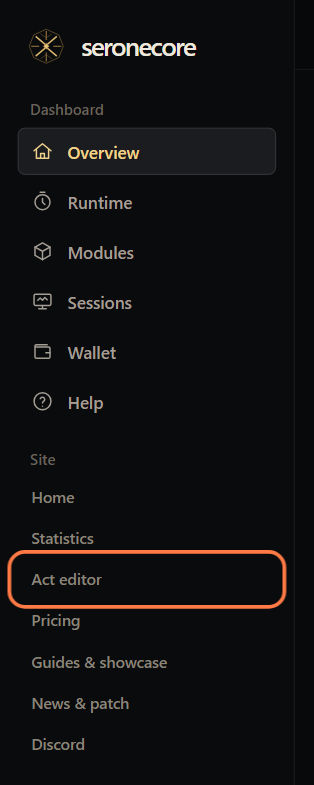
- The link shows only when a key of this account has the module. The Overview card Modules has an Act editor button too.
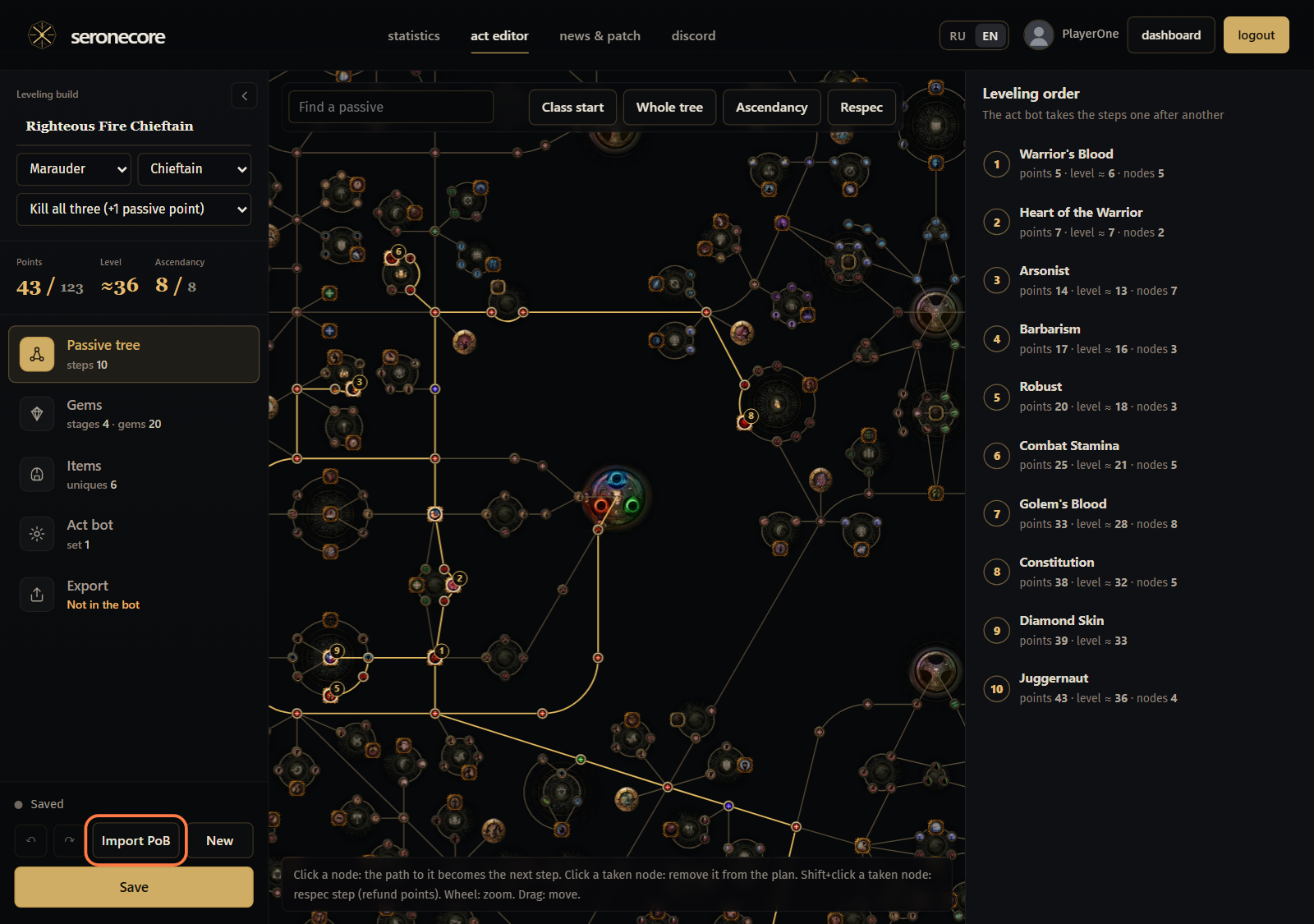
The panel on the left holds the build: its name, class, ascendancy and bandits, the points and the level, the tabs Passive tree, Gems, Items, Act bot and Export, and Save at the bottom.
Import from Path of Building
Click Import PoB at the bottom of the left panel.
Paste the Path of Building export code, the build XML, or a link: pobb.in, pastebin.com, poe.ninja/pob or a build of this editor. Click Read the build.
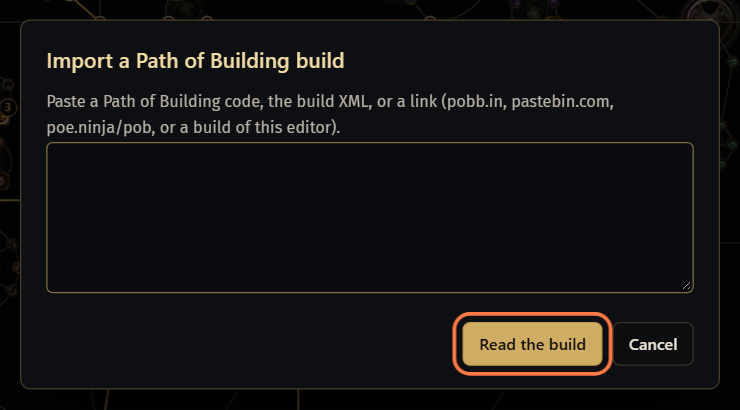
The next window lists the trees of the build. Keep ticked the trees to take, in their order, and click Import. Each tree becomes steps of Leveling order; between two trees a respec step refunds what the next tree does not have.
Gem and item sets whose titles name levels (for example
Lvl 12-27or28+) become stages that start at that level. Gems the quest vendors do not sell are skipped, and the editor says how many.The import replaces the build open in the editor (↶, Ctrl+Z, brings it back). It is not saved yet: click Save when the build is ready.
You can also plan the tree by hand: on Passive tree click a node, and the path to it becomes the next step. Leveling order on the right lists the steps the act bot takes one after another.
Gems and links by level
The build is split into stages by character level. A new build has four: Lvl 1-11, Lvl 12-27, Lvl 28-37 and Lvl 38+. The bot switches gems and items when the character reaches the stage level.
Open Gems and click a stage at the top. The line under it shows which gems the stage adds and removes against the stage before.
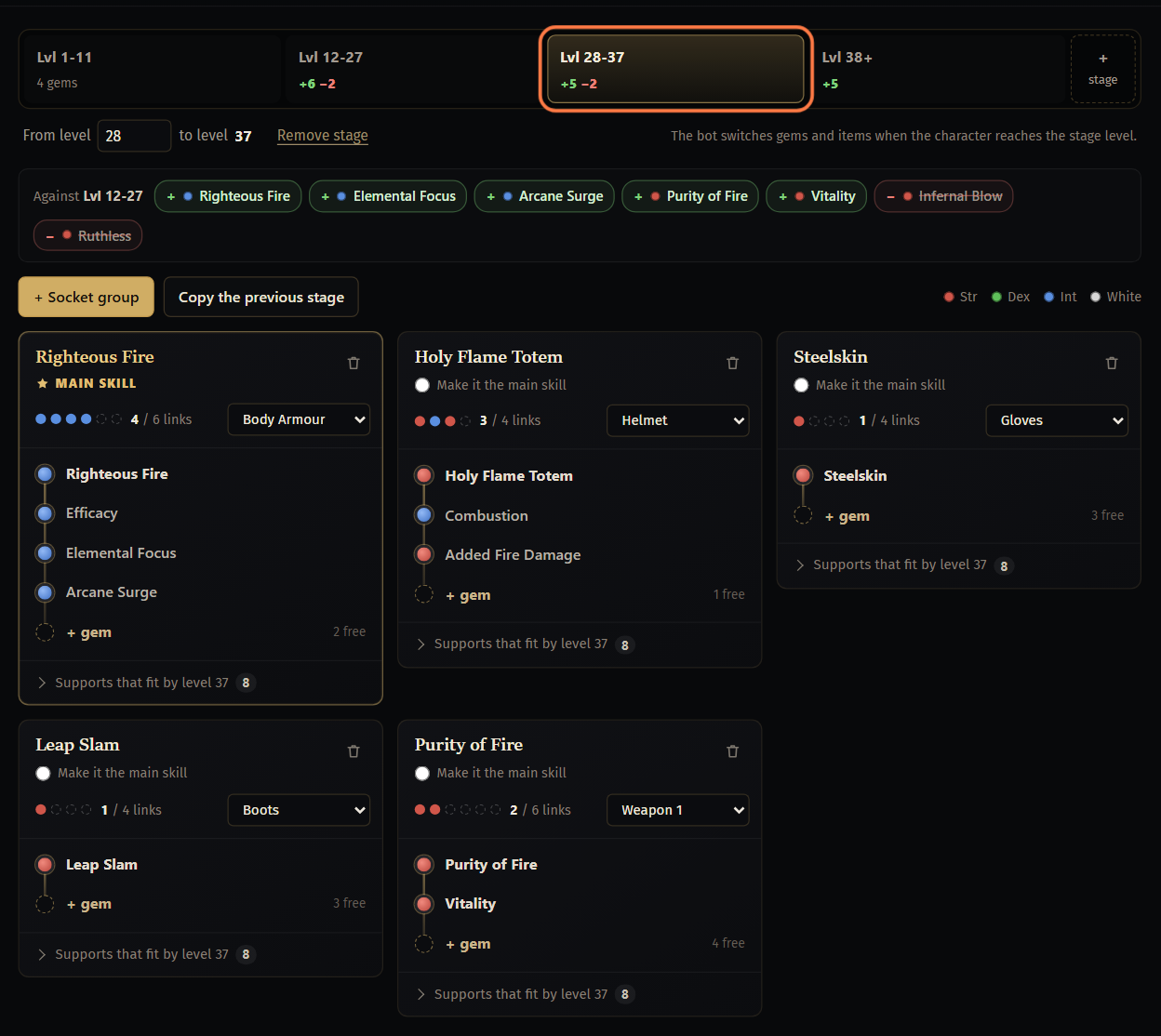
+ Socket group adds a group. Choose the item it sits in (Body Armour, Helmet...) and add gems with + gem. Copy the previous stage starts the stage with the gems of the stage before.
Make it the main skill marks the attack of the stage: the main group gets the most links, and the act bot attacks with it.
+ stage splits the selected stage in two, From level sets where a stage starts, Remove stage removes it. A stage without gems keeps the gems of the stage before.
A gem the class cannot have yet at the stage level is marked buy from level 28 (its first vendor for this class), needs level 28 (its own requirement) or drop only.
Vendor search under the groups gives lines for the search box of a gem vendor in the game: the gems of the build light up there. Copy puts a line on the clipboard.
Items by level
Open Items, pick the stage at the top and click a slot to choose its item: a unique, a base or a weapon type, a flask, or Any item (the bot picks the best it finds).
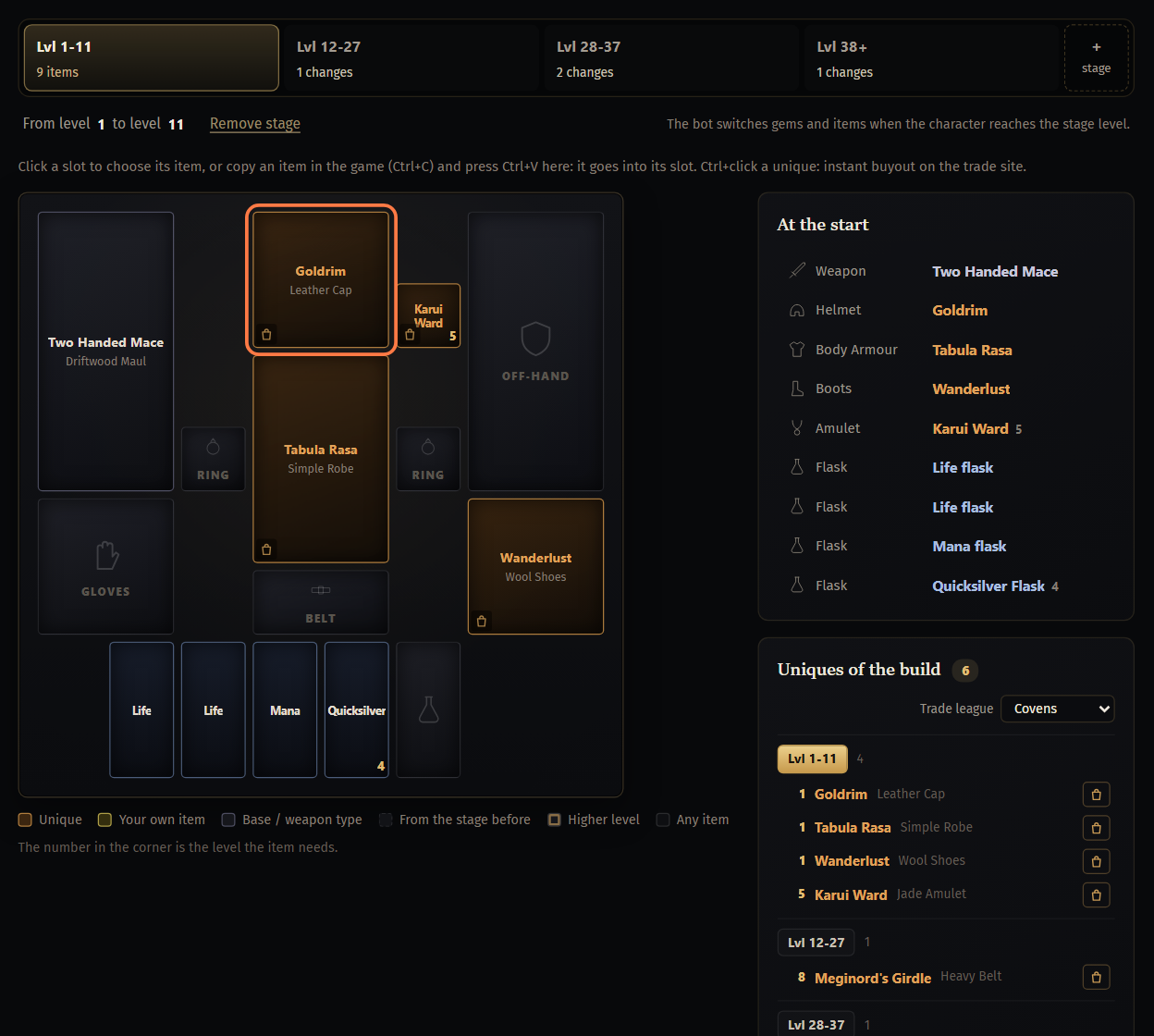
Or copy an item in the game (Ctrl+C) and press Ctrl+V on the tab: it goes into its slot.
A later stage keeps an item until you change it there. Same items as the stage before fills the stage with the items of the stage before.
Uniques of the build lists the uniques of every stage with the level each one needs. Put them into your stash: with the act bot mode Full leveling items (prepared PoB items) the bot takes the items of the build from the stash and wears them by level. More in Act Bot: the campaign on your build.
Act bot settings in the build
The Act bot tab holds act bot settings that go with the build: mode, combat, campaign, grinding, passives and gems, gear and flasks, town and loot, and the optional quests. Change only what this build needs; the left panel counts the changed ones.
When the act bot loads the build, these settings replace the ones on its page while Use the act bot settings saved in the build is on (Start tab, on by default).
Send the build to your act bot
Click Save. Every save updates the link and the bot.
- You keep up to 3 builds; Saved builds: on Export shows how many.
Open Export. Under Send it to your act bot, click Send to my act bot. In My builds on the right, To the bot does the same for any of your builds.
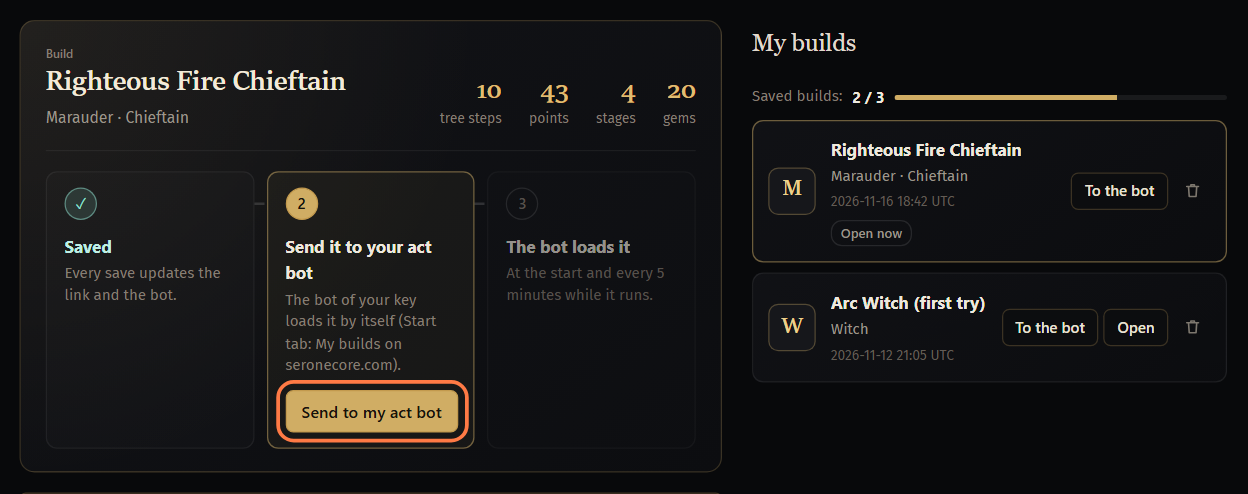 Important: Run the act bot with a key of the same Discord account: the site finds your builds by the key.
The panel then says In your act bot. The act bot of your key loads the build by itself at its start and every 5 minutes while it runs, and loads every later save of this build the same way.
On the act bot's Start tab your saved builds are also under My builds on seronecore.com: press Refresh, choose one and press Load. How the act bot plays the build: Act Bot: the campaign on your build.
Copy link and Copy PoB code on Export give the build for Path of Building, or for the Path of Building field of the act bot.
If something goes wrong
What you see and what to do- The editor page shows only
It comes with the act bot module of your key.and Open the dashboard - None of your keys has the Act Bot module. Add it on the dashboard, tab Modules. The free 2 hours run the act bot only with the ready builds.
Save the build first: the bot gets the saved version.- The build changed after the last save. Click Save, then Send to my act bot.
To save another one, save over one of yours or delete one.- You have 3 saved builds. Open one of them and save over it, or delete one in My builds (the bin icon). A deleted build's link stops working for the bot too.
- Check before you use it on Export, with a line like
Lvl 12-27: Arcane Surge can be bought from level 28 (Siosa, act 3), the gem itself needs level 1. - A stage asks for a gem this class cannot buy yet at that level. Move the gem to a stage that starts at the level the line names.
- The act bot still plays the old build
- The bot takes the saved version: save the build, then check that Export says In your act bot. The bot looks at the start and every 5 minutes; to load at once, press Refresh and Load under My builds on seronecore.com on its Start tab.
Stuck on a step?
Ask in #support on our Discord and send your log with Copy log: it shows what the bot saw.