Guide · Getting started
Your key: runtime, modules and the free trial
Your account has one key. It holds the time you buy and the modules it opens. You paste it into seronebot once: seronebot saves it and checks it at every start.

Where to get the key and where to paste it
Sign in on seronecore.com with Discord. Your account gets one key.
Open the dashboard. The key is in the Your key box at the top of Overview. Its middle is hidden: Show shows it, Copy key copies the whole key.
In the seronebot launch window, under Enter your seronecore key, paste the key with Ctrl+V and click Activate.
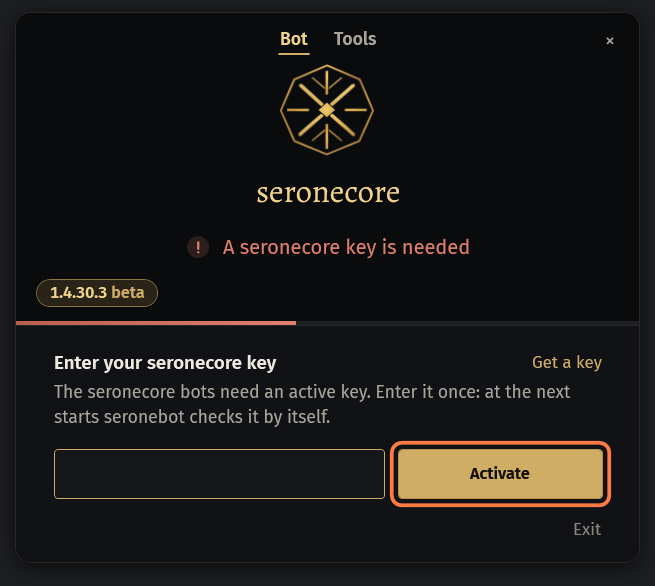
- Get a key in that window opens the dashboard.
- seronebot saves the key in
Settings\seronecore\seronecore.keynext toseronebot.exeand checks it by itself at every start.
To use another key, click the key card at the bottom of the menu, then Change key.
When you buy time, the days go onto the same key: you do not paste anything again.
The 2 free hours
Every new account gets a key. The 2 free hours go on it when the Discord account is older than 30 days, and no other account got free hours from the same internet address in the last 30 days or on the same PC.
Look at the time card on Overview. Trial key · 2 hours with the time left means the free hours are on your key.
Try any boss with them, or Act Bot: it is open while your 2 free hours last. After that Act Bot is a league module.
Use them within 7 days.
Important: Unused free hours burn after 7 days without a run, and 30 days after they are given at the latest.
How the time is spent
Time runs while seronebot is open with your key, from the moment it connects to the game, even when the bot is stopped. 30 days of runtime are 720 hours of that, not a calendar month.
Close seronebot when you do not use it: that stops the time.
Count your windows. Every seronebot open with the key uses time of its own, on one PC or on several: two at once use it twice as fast.
Click the key card at the bottom of the menu (or the key's time in the top line of the small window) to see how long the time lasts at this rate.
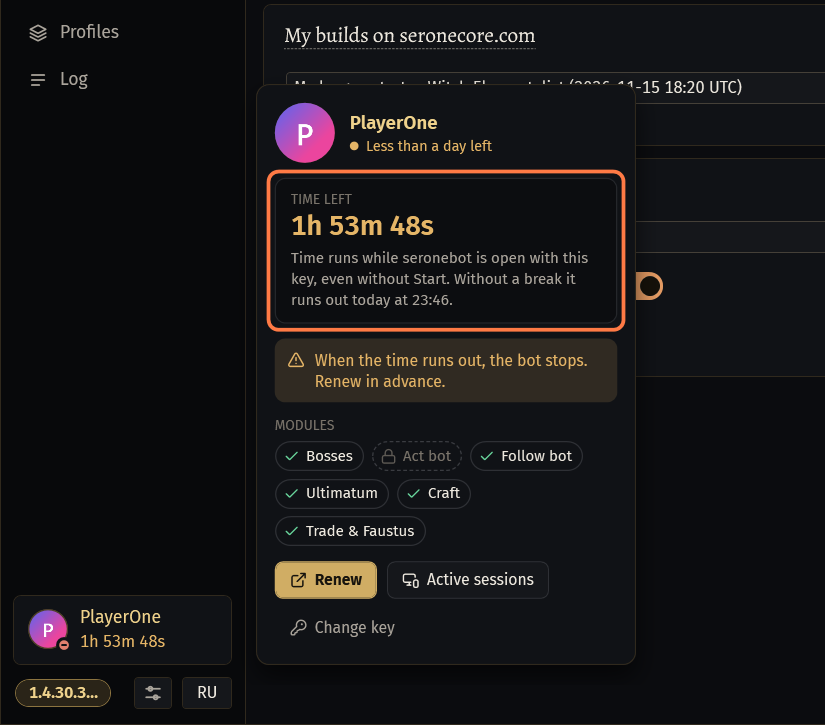
- One window: Time runs while seronebot is open with this key, even without Start. Without a break it lasts until …
- Several: 3 seronebot are on this key now, the time runs out 3 times faster. At this rate it lasts until …
On the dashboard, Sessions lists every seronebot that runs on your key.
Under a day left, the time on the key card turns yellow and the profile card says Less than a day left. When the time runs out, the bot stops. Tools and SOCMultiPoE use no time, but Tools open only while the key has time.
Modules and the lock Not in your key
A module is a part of the bots your key opens. Any runtime opens every boss, Ultimatum, Bestiary, Craft, Trade / Faustus, Tujen Reroll and Deck Opener, and FollowBot. Act Bot is a league module: it is bought for the current league, or comes with a new purchase of 1000 days.
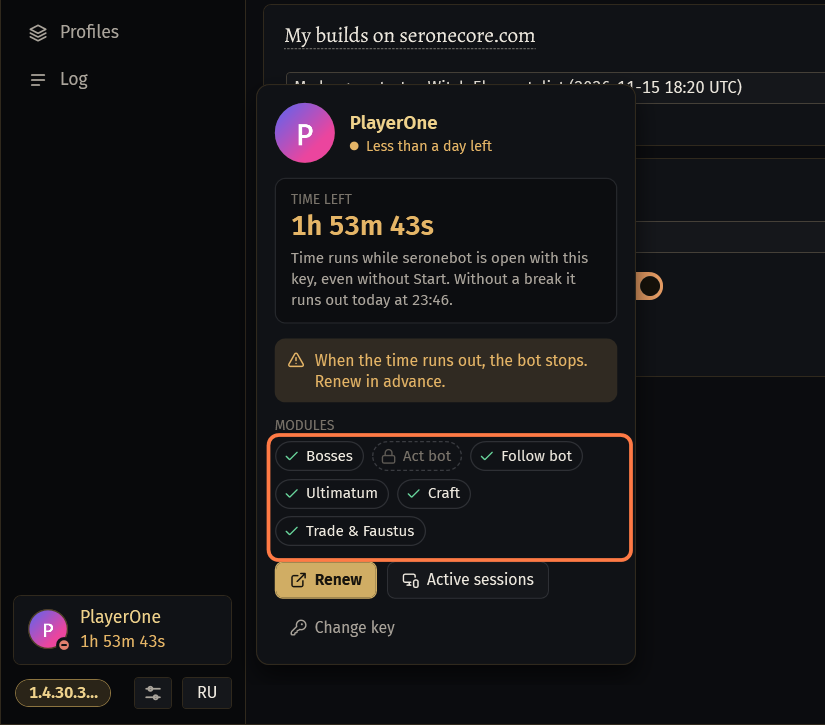
Click the key card and look at MODULES. A module with a lock is not in your key.
A bot or method your key does not include shows Not in your key over its page, with the reason, for example The act bot is not in this license key: unlock it on seronecore.com/dashboard.
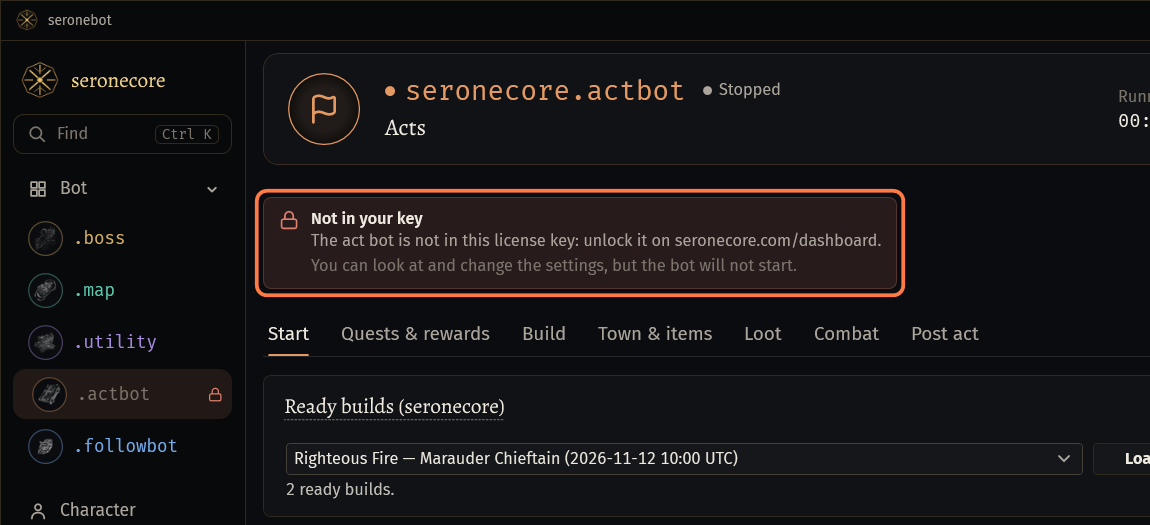
- You can look at and change the settings, but the bot will not start.
- In the small window its Start button says No access. In the menu the bot is dim, with a lock.
To add a module, open Modules on the dashboard, click Unlock next to it, then Buy with balance.
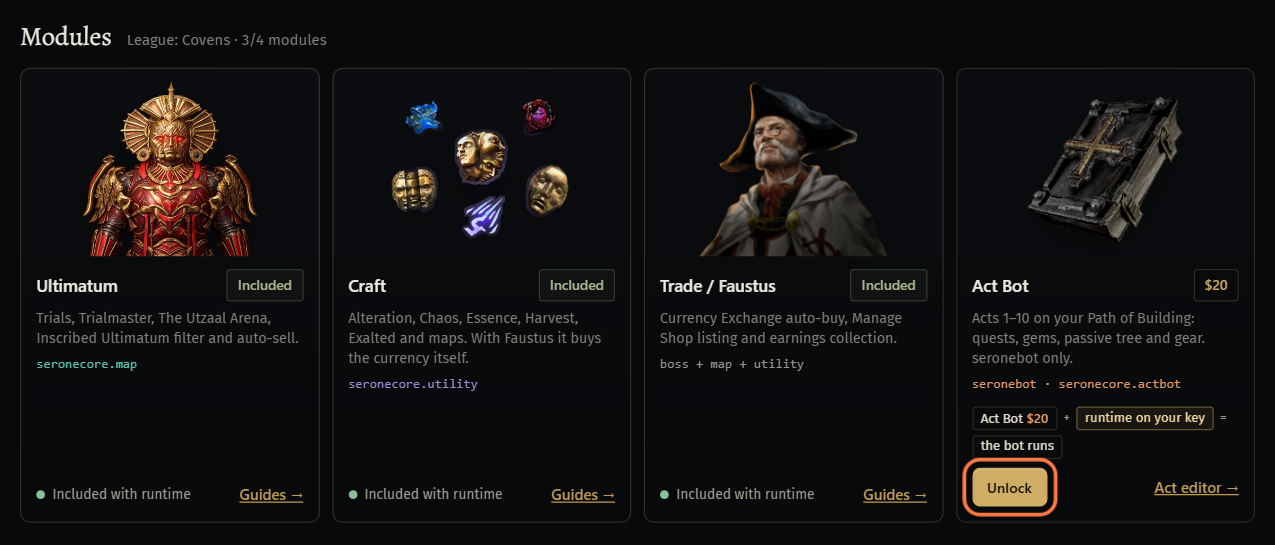
- A module only opens the bot: the bot runs only while the key also has time.
Add funds and buy time
You pay in two steps. First you add funds to your account balance, in crypto through NOWPayments. Then you buy runtime and modules from that balance.
On the dashboard click + Add funds at the top, or open Wallet.
Under Add funds pick an amount, or type it in Top-up amount. The minimum amount is shown under the field.
Pick the coin in Payment currency and click Continue to NOWPayments.
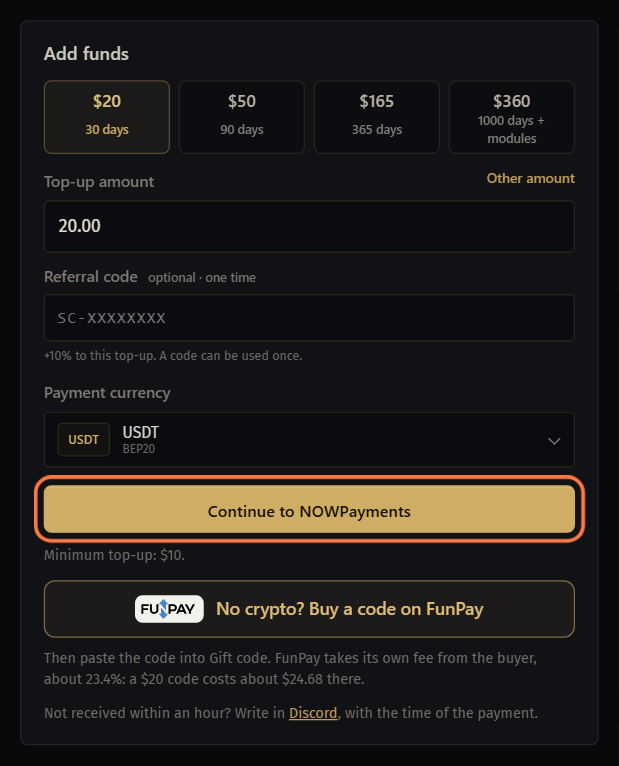
Pay the invoice on NOWPayments. The balance updates by itself once the network confirms the transfer.
- Not received within an hour? Write in Discord, with the time of the payment.
Open Runtime, click the row with the days you want (or set Custom duration) and click Pay $… from balance under Order summary.
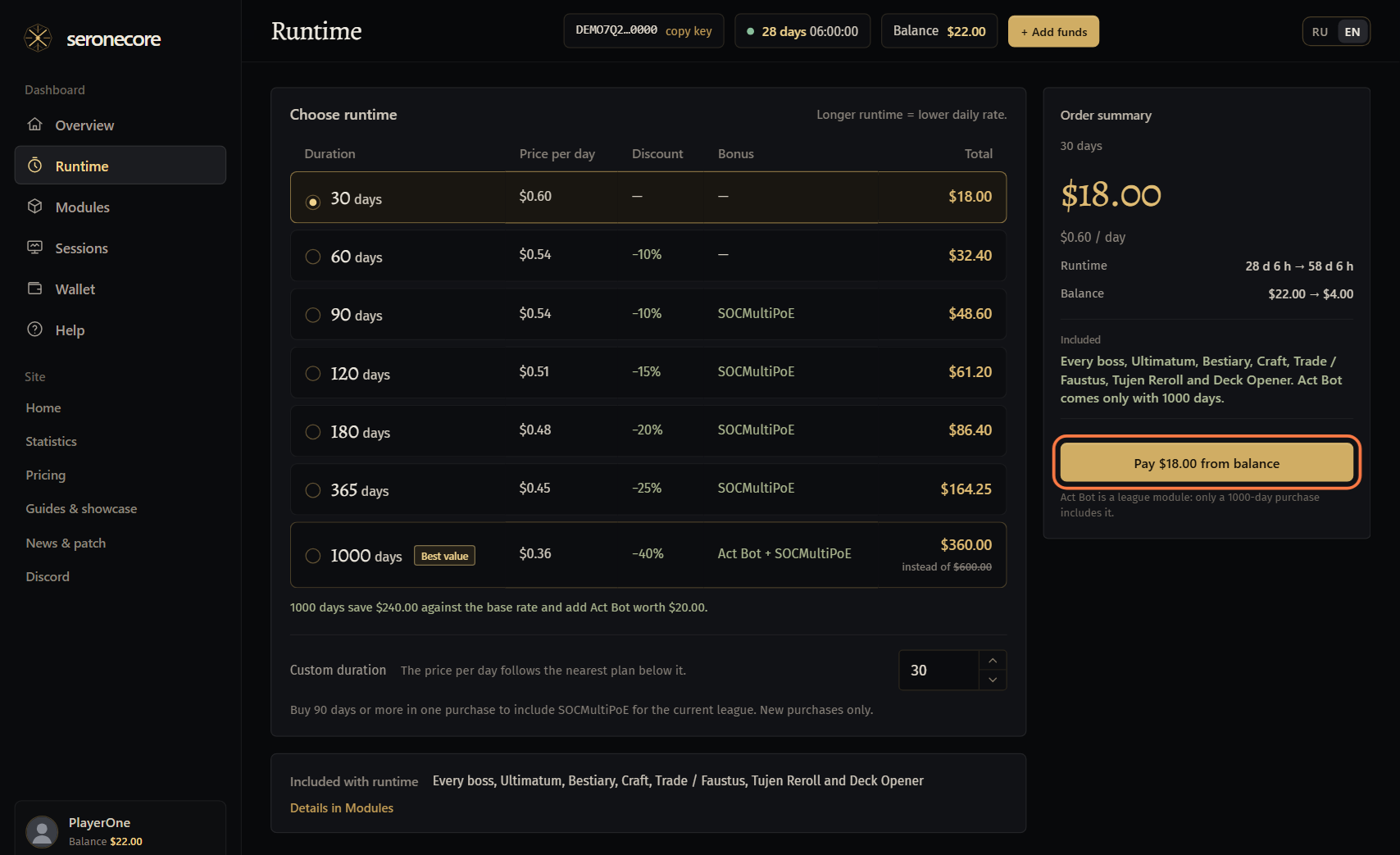
- Longer runtime = lower daily rate. The days are added to the same key.
Have a gift code? On Wallet type it under Gift code and click Redeem.
- A balance code puts its dollars on your balance, a promo code adds days to your key.
The key stays the same after you extend. If seronebot stopped because the time ran out, start it again: it checks the saved key by itself.
Runtime prices: the price table on the home page.
Keep the key to yourself
Never post the key in Discord, in a screenshot or in a message. Whoever has it can run seronebot on your time, and each of their windows uses it too.
Do not send your
Settingsfolder to anyone: the key is saved there.To send a log, use Copy log or Bug report in seronebot. The copied log is sealed: only the developer can read it. The bug report cuts the key out.
On the dashboard keep the key hidden (do not click Show) when you share your screen or stream.
Look at Sessions on the dashboard now and then. A running seronebot you do not know is a sign the key got out: write to us on Discord.
If something goes wrong
What you see and what to do- The key has expired
- The key has no time left. Buy runtime on the dashboard: the days go onto the same key. Then click Activate again, or start seronebot again.
- The site does not know this key
- Copy the key from the dashboard again with Copy key and paste it with Ctrl+V, with no spaces around it. Then click Activate.
- The key is invalid or has expired
- Check on the dashboard that the key has time left. Then copy it again with Copy key, paste it with Ctrl+V and click Activate.
- The key is no longer active
- Check on the dashboard that the key has time left. If it has, write to us on Discord.
- The site did not accept the key or did not answer
- Check that seronecore.com opens in your browser. A VPN, a proxy or a firewall can block seronebot: turn it off for a test, or allow seronebot in your firewall.
- Paste the key.
- The field was empty when you clicked Activate. Paste the key with Ctrl+V first.
- Not in your key
- Your key does not include this bot or method. Click the key card to see the modules of your key. Pick a bot your key has, or add the module on the dashboard: Modules, Unlock.
- Download opens while your key has runtime
- The dashboard lets you download seronebot only while the key has time. Buy runtime first.
Stuck on a step?
Ask in #support on our Discord and send your log with Copy log: it shows what the bot saw.