Guide · Settings
Loot filter
Every bot that picks up loot has the same choice on top, Where to take from: what your game's loot filter shows, what it shows and the bot's rules let through, or everything on the ground by the rules. The rules are different in each bot.
Where to take from: the three choices
Game filter: the bot takes everything your game's loot filter shows, and nothing else.
Through the game filter: of what your game filter shows, only what the bot's rules let through.
Everything on the ground: by the bot's rules, also what your game filter hides. The bot shows the hidden labels with Alt held and clicks them.
Each bot has its own choices and default:
- .boss: Game filter (default), Through the game filter, Everything on the ground.
- .actbot and .followbot: Everything on the ground (default) or Through the game filter.
- .map with Juiced Maps: Game filter (default), Game filter and valuable, Everything on the ground by price. The other map methods take what your game filter shows.
Gold is never clicked: the character collects it by walking over it.
With Game filter or Through the game filter the bot sees only what your game's loot filter shows. Keep a filter in the game that shows what you want the bot to take.
Boss bot: the Loot filter tab
Each boss method has its own rules.
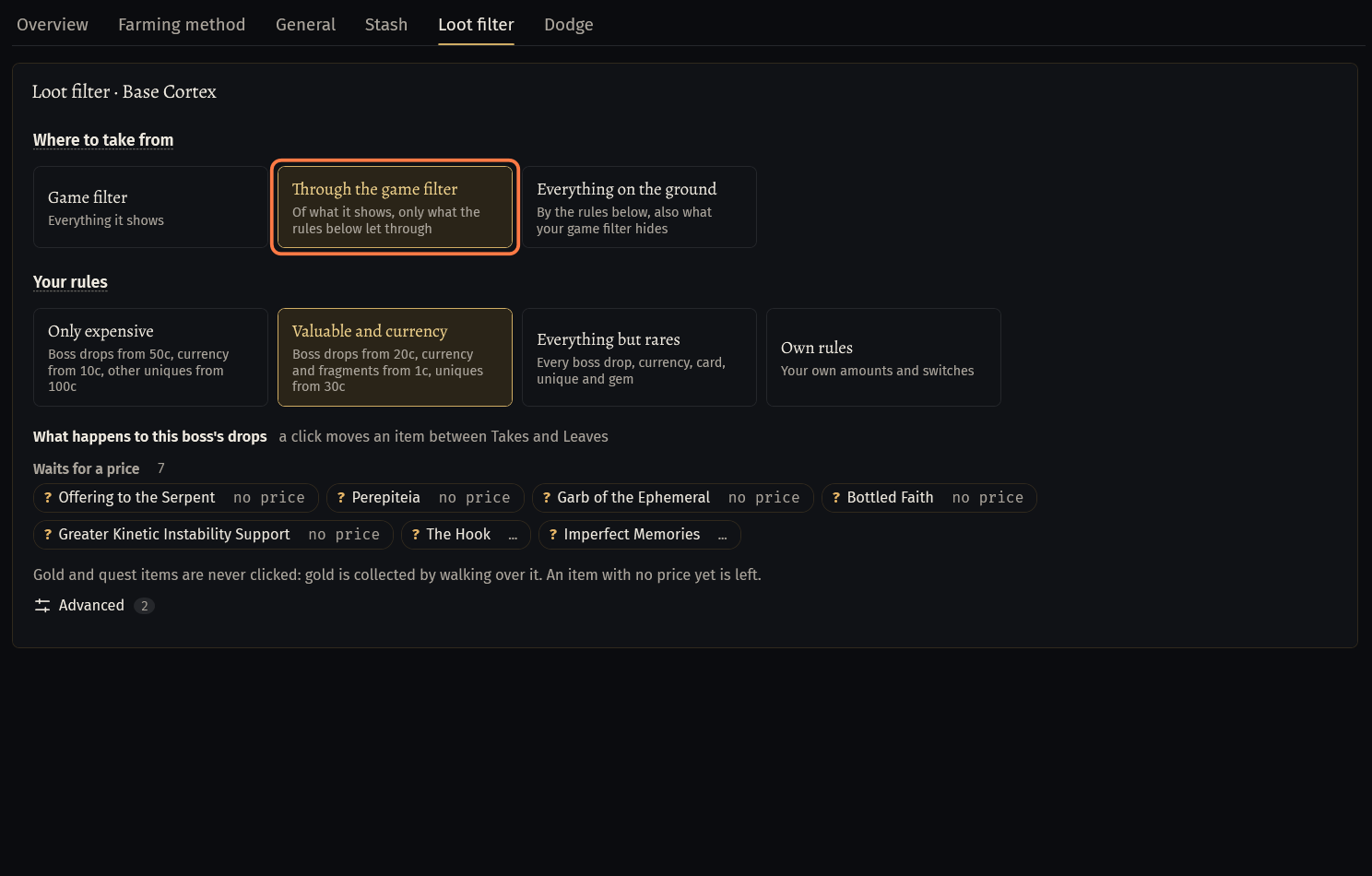
Open .boss, pick the method, then the Loot filter tab. The card is named after the method, for example Loot filter · Uber Elder.
Click Through the game filter or Everything on the ground to use the rules. With Game filter the rules are hidden: they count only for the other two.
Your rules: pick a ready set in one click.
- Only expensive: boss drops from 50c, currency from 10c, other uniques from 100c.
- Valuable and currency (default): boss drops from 20c, currency and fragments from 1c, uniques from 30c.
- Everything but rares: every boss drop, currency, card, unique and gem.
- Own rules: your own amounts and switches.
Own rules shows the amounts: Boss drops from, chaos, Currency and crafting from, chaos, Fragments from, chaos, Divination cards from, chaos, Maps and invitations from, chaos, Other uniques from, chaos. And the switches, all off by default: Any price, Other gems, Rare items, Influenced items, Magic and normal items.
What happens to this boss's drops: the boss's own drops in three groups, Takes, Leaves and Waits for a price, each with its price. Click an item to move it between Takes and Leaves: a dot after the price marks your own choice (gold: always, grey: never).
- Waits for a price: the price has not come yet. Such an item is left on the ground until it has a price, unless you set it to always.
- Uniques whose price depends on their rolls, such as Impresence, are taken always by default.
Prices: the boss's own drops by the trade site (the price list of our server); currency, fragments, cards and maps by poe.ninja, for the whole stack.
Same rules for every boss (in Advanced) gives every boss the choice and the set of this method. Each boss keeps its own clicks on its drops.
The boss rules are new: if the bot leaves an item you expected it to take, press Copy log and send us the log. Quest items are never clicked by these rules.
Act bot and FollowBot: the Loot tab
Open .actbot, tab Loot. In Where to take from pick Everything on the ground (default) or Through the game filter.
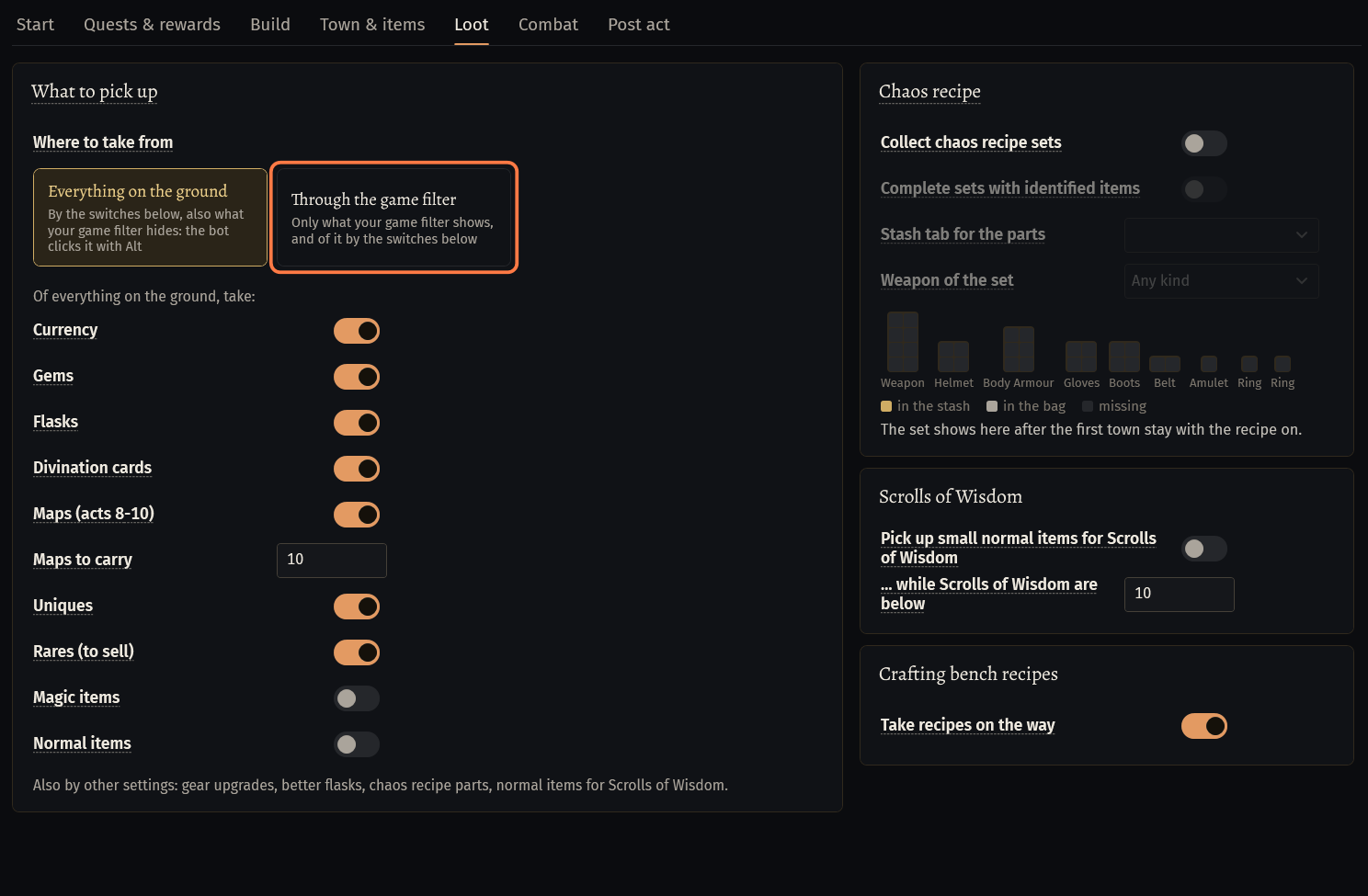
The switches choose what is taken: Currency, Gems, Flasks, Divination cards, Maps (acts 8-10) with Maps to carry, Uniques, Rares (to sell), Magic items, Normal items. With Through the game filter they choose only among what your filter shows.
- The mode on the Start tab sets these switches: Full leveling items (prepared PoB items) leaves only Currency on. You can change them after.
Quest items and Labyrinth keys are always picked up. Gear upgrades, better flasks, chaos recipe parts and normal items for Scrolls of Wisdom are taken by their own settings.
FollowBot: with Pick up items on (off by default) it takes the loot of the act bot's Loot tab, with the same Where to take from. Off, it takes only the quest items of its own quest steps.
Map bot (Juiced Maps): the Loot filter tab
Open .map with the Juiced Maps method, tab Loot filter. Loot radius: how far from its path the bot goes for loot (60 by default, 20 to 150).
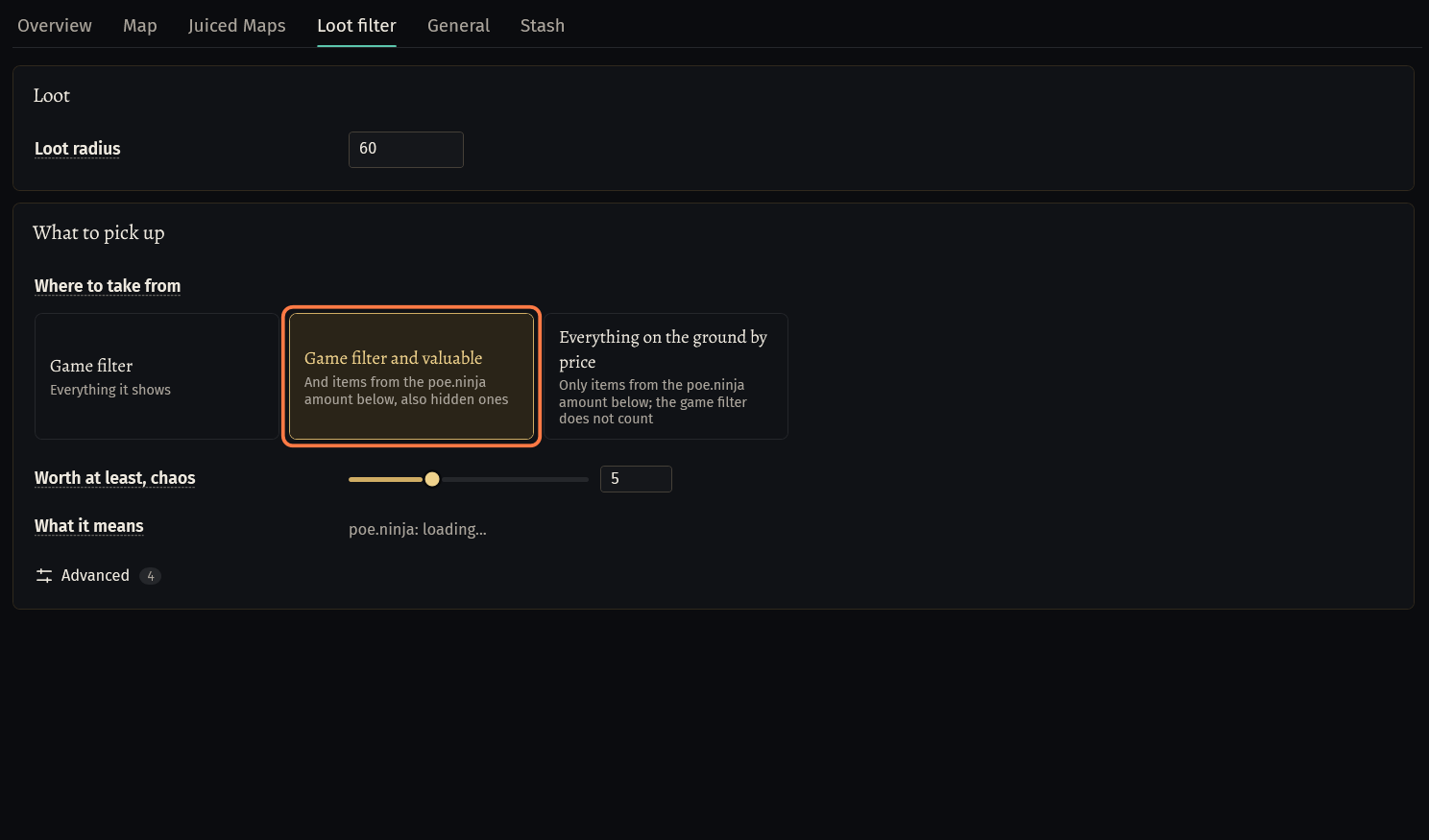
What to pick up → Where to take from: Game filter (everything it shows), Game filter and valuable (and the items worth the poe.ninja amount below, also hidden ones), Everything on the ground by price (only the items worth the amount: the game filter does not count).
Worth at least, chaos (5 by default, for the whole stack): move the slider or type the number. What it means shows items of the league around that price and whether the bot takes them.
Advanced (Loot by poe.ninja): Categories, Always pick up, Never pick up and Price each unit of a stack. Never pick up counts with every choice, also with Game filter.
Ultimatum, Inscribed Ultimatum and Beasts take what your game filter shows. The Inscribed Ultimatums the Ultimatum method picks up are set on its Ultimatum tab: Min. monster life, % and Always pick up Divine Orb rewards.
If something goes wrong
What you see and what to do- Waits for a price next to a boss drop on the Loot filter tab
- The bot has no price for this item yet, so it would leave it. Wait a minute with the bot running: the prices come by themselves. To take it whatever the price, click it into Takes.
Loot: No room in the inventory for an item (Magic, 2x2, 5 cell(s) free). (W-95WH)- The inventory is full. Take your own items out of it: the bot needs the cells for loot. The boss and map bots stash their loot by Dump when slots used (Stash tab); the act bot goes to town.
Stuck on a step?
Ask in #support on our Discord and send your log with Copy log: it shows what the bot saw.