Guide · Utility
Utility: Craft, Tujen Reroll and Deck Opener
The utility bot (.utility) does one job in your hideout until it is done. Craft uses currency on the items of one base until each meets your goal. Tujen reroll buys Tujen's valuable offers and refreshes his stock. Deck opener opens Stacked Decks and keeps the cards you want.
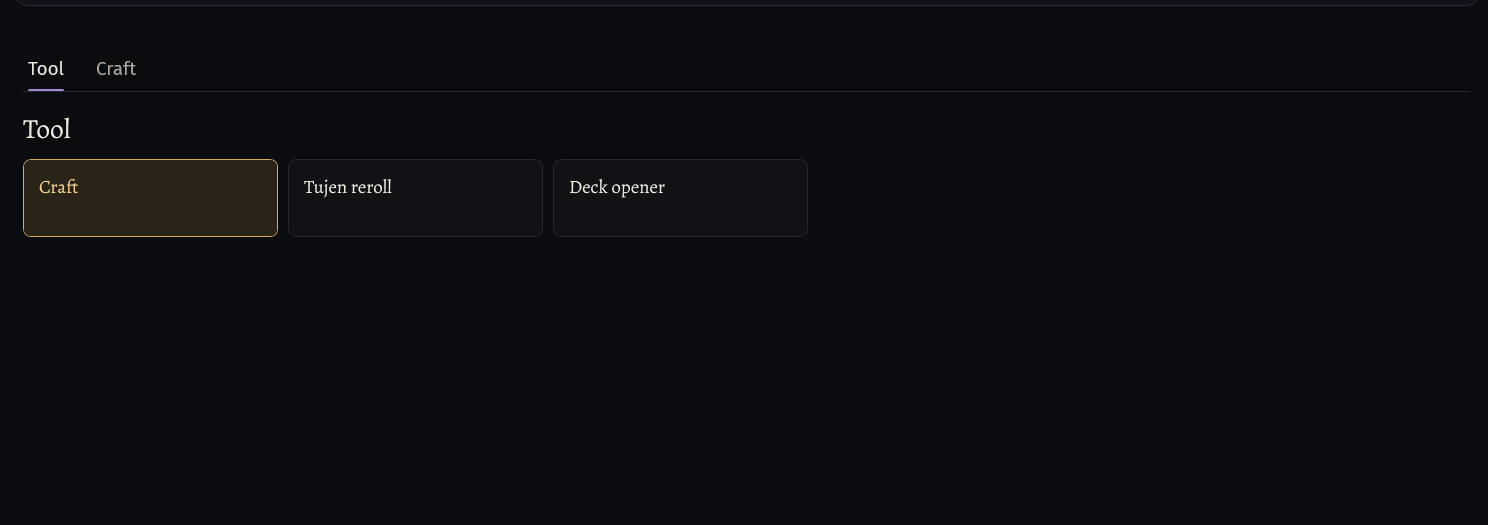
Pick the tool
In the menu under Bot, click .utility. The page opens on Tool.
Click the tile of the tool: Craft, Tujen reroll or Deck opener. The page goes to the tool's own tab.
- A tool outside your key has a lock on its tile, and the bot does not start with it.
What a tool buys and sells at Faustus is on the Trade page of the menu: crafting currency and bases for Craft, Exotic Coinage for Tujen reroll, Stacked Decks and card sales for Deck opener.
Start the bot in your hideout, with the game open on your character.
Craft: the item and the method
Put the items to craft, all of one base, into the inventory, or into a stash tab: card Items, Take from (Inventory, Player Stash or Guild Stash), Tab and Per trip.
Tab Craft, card Item: in Base pick the base from the list. The list reads your inventory, so open the game first; the round arrow next to it reads the inventory again. poedb base and Influences fill in by themselves.
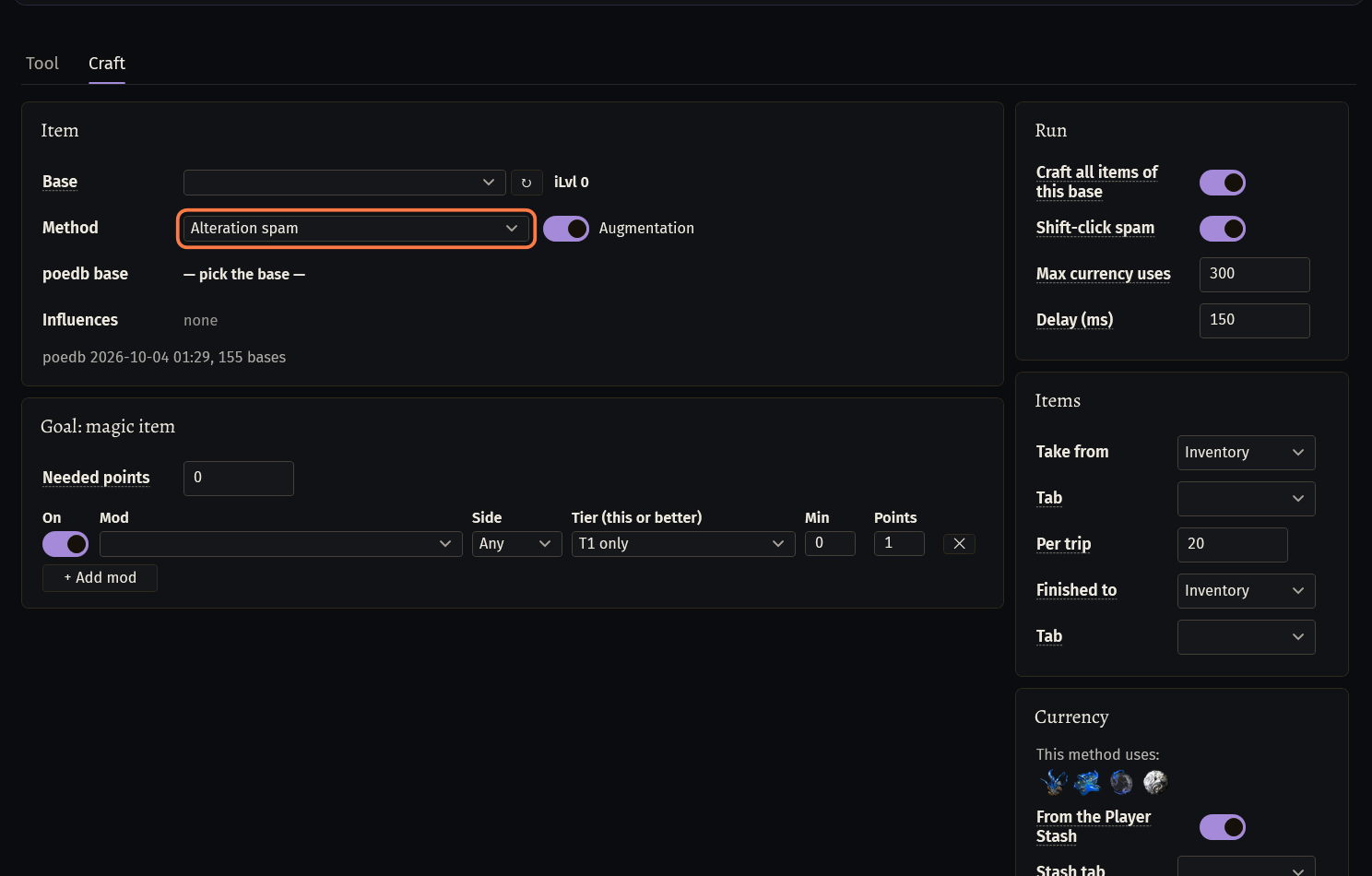
Method: Alteration spam, Alteration -> Regal -> Exalted, Chaos spam (rare), Alchemy + Scouring (rare), Essence spam, Harvest reforge (Horticrafting Station) or Sockets (Jeweller's / Fusing / Chromatic).
- Augmentation (Alteration spam only): also used on items with one mod.
- A map has its own goal card, Goal: map. A Nightmare Map takes Chaos spam (rare) only.
Card Currency: what the method uses. From the Player Stash takes it from the stash (Stash tab; empty = search all tabs).
Craft: the goal and when the bot stops
Goal: magic item (the Alteration methods) and Goal: rare item: a row for each mod you want, with Mod, Side, Tier (this or better), Min (the last number of the mod, 0 = off) and Points. + Add mod adds a row.
Needed points: the item is done when its mods give this many points (0 = all rows).
The other methods have their own card: Essence (the essence to use), Harvest (Horticrafting Station) (Recipe: words of the recipe's name, and Lifeforce stacks), Sockets (Sockets, Links, Colours (minimum), 0 = off).
The bot stops when every item of the base is done (Craft all items of this base, on by default; off: one item), when Max currency uses is spent (300 per bot start), or when the currency runs out and cannot be bought.
Finished to: Inventory, Player Stash, Guild Stash or Faustus shop (listed in Manage Shop), with its Tab.
Shift-click spam (on) and Delay (ms) (150) set the pace.
On the Trade page, Crafting currency (on by default) buys the method's currency at Faustus, Currency Exchange, when it runs out: PAY WITH and Per order. Finished items checks the price of every finished item on the trade site (the price goes to the log) and, with List in the Faustus shop, lists it there.
Tujen reroll
Tujen must stand in your hideout. The bot buys his offers worth the minimum, the most valuable first, and refreshes his stock with Exotic Coinage.
Tab Tujen, card What to buy: Min value (chaos): the poe.ninja price of the whole stack an offer must be worth (5 by default).
Card Haggle: First offer % of Tujen's price (70), Raise when refused % (5), Max offer % (80), Offers per item (3), and Stacks: buy as many as the artifacts reach (on).
Card Run: Max refreshes (50 per bot start), Stash tab for what it bought (empty = the open tab), Min free cells (fewer = the inventory goes to the stash).
Card Exotic Coinage: Restock when it runs out (from the stash, then Faustus), its Stash tab and Amount. The Faustus purchase: Trade page, Exotic Coinage through Faustus (on by default).
Card Stop refreshing when artifacts are low: a number for Lesser, Greater, Grand and Exceptional (0 = not checked) and Stop when: All are below or Any is below.
Deck opener
The bot takes Stacked Decks to the Menagerie and opens them there. A card worth at least the minimum goes into the inventory, a cheaper one is dropped on the floor. In the hideout the bot sells or stashes the kept cards.
Tab Deck opener, card Stacked Decks (hideout stash): the Stash tab with the decks (premium tabs too; empty = search all tabs) and Decks per trip (100).
Card Cards to keep: Min price by poe.ninja (10 Chaos Orb by default), Stash tab for cards and Stash tab for orbs.
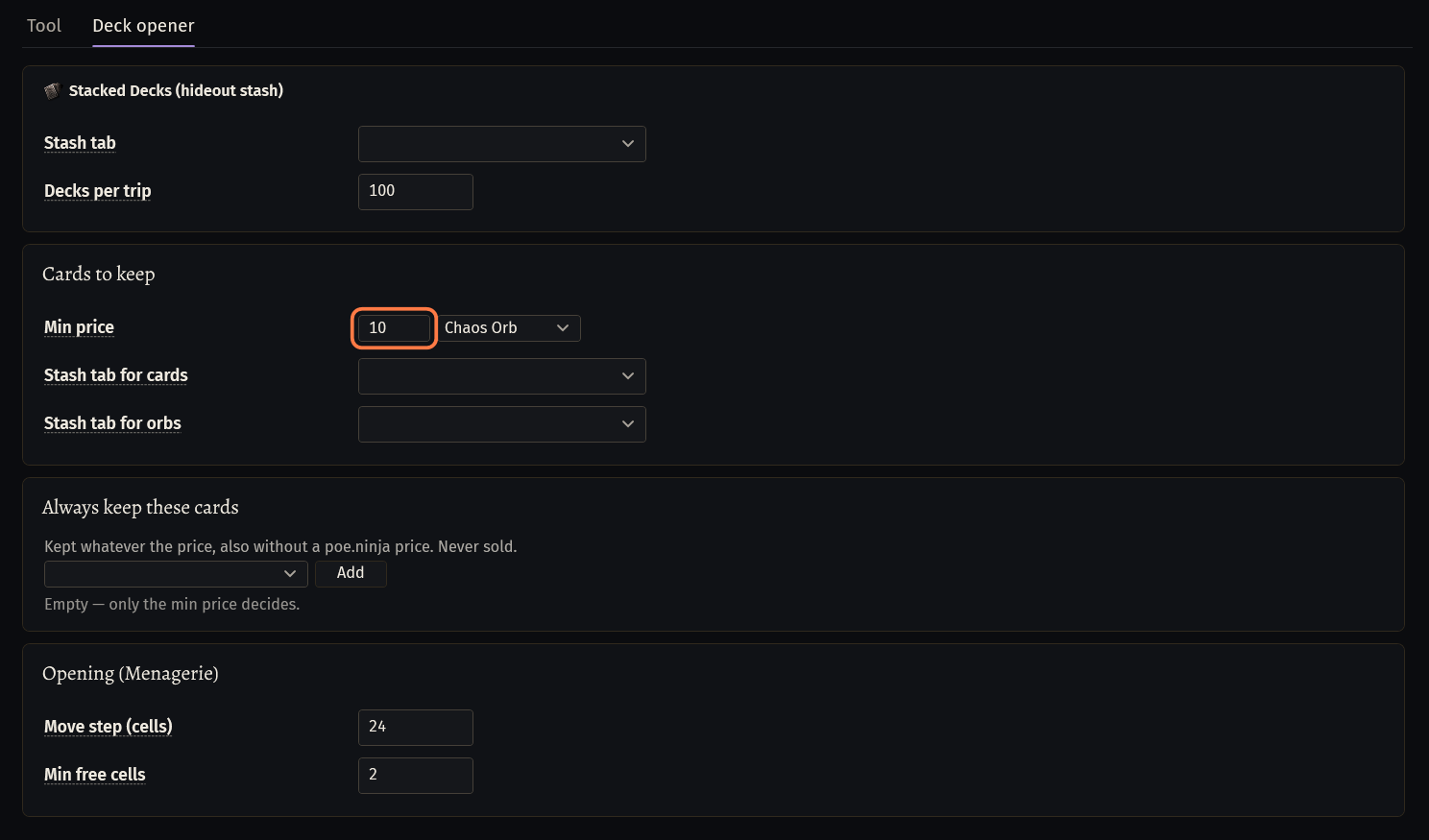
Always keep these cards: kept whatever the price, also without a poe.ninja price, and never sold.
Card Opening (Menagerie): Move step (cells): with no room on the floor the character walks this far. Min free cells: with fewer, the bot goes back to the hideout with the cards.
Trade page, What to do with the kept cards in the hideout: Put them into the stash (Stash tab for cards) or Sell them through Faustus (Currency Exchange, settings on the right) (default). Cards of the Always keep list always go to the stash.
Buy Stacked Decks (the stash has none): Buy through Faustus is on by default. Set Pay with, Decks per order or Max Divine per order, and Max price (chaos) (0 = no limit).
Watch the first run
The tools have run in our games, but not every part has. Watch your first run with these, and if the bot does something you did not expect, press Copy log and send us the log.
Deck opener: the Faustus trip that sells the cards and buys new decks in one visit, and the pickup of kept cards from the floor, were changed after our last run.
Craft: Bases to craft on the Trade page (off by default) buys a new base with its influences on The Market when the source tab has none left. It has not run yet.
If something goes wrong
What you see and what to doNot in this license key: the bot does not start with Craft.(tooltip of the Craft tile)- Your key does not include Craft. Pick another tool, or add Craft on the dashboard of seronecore.com.
— pick the base —next to poedb base- No base is chosen. Open the game with the items in the inventory, click the round arrow next to Base and pick the base from the list.
Stuck on a step?
Ask in #support on our Discord and send your log with Copy log: it shows what the bot saw.